Sunday, December 28, 2008
While not related to this site in any way, it's been a while since i've posted and thought you might like to see this link.
http://www.wiihacks.com/forum.php
Here you can talk with other wii hackers about all sorts of wii related things. We don't run the forum, but it looks very active, so give it a try.
Tuesday, December 23, 2008

Hi all visitors,
First of all I want to say "THANK YOU" to you that always support Relax-Games blog but in this occasion I have a bit long holiday for Christmas so i will be back soon and bring an interesting games to you back in next year.
Merry Xmas & Happy New Year 2009 to you all
Token
Monday, December 22, 2008
Beautiful Mess by Jason Mraz
Still working on this one, but I like it...
Thursday, December 4, 2008
I’ve experienced 100s of Firefox add-ons, and have whittled them down to about two dozen I use on a regular basis — even out of these, I have favorites. Here are 4 I find both casually enjoyable and sheerly indispensable; I hope they add value to your browsing. Even if you’ve heard of them before, I share specific reasons why they’re so useful + fun (usefun!). All are compatible with the wonderful Firefox 3:
DownloadHelper
Ever wanted to download Flash videos from YouTube or another site and found yourself frustrated by sluggish web conversion utilities?
This add-on keeps rocketing in popularity, and with good reason: it simplifies the process of downloading multimedia with a couple clicks. It can be as easy as opening a movie-playing page, clicking the toolbar icon, and selecting the file to download. Moments later, it’ll be on your hard drive.
The interface is a bit odd at first, but once you get up to speed, it’s a breeze. I use this for archiving FLV copies of videos I’ve created — please don’t do bad things with it.
Picnik
Picnik has saved me a tremendous amount of time by removing wasteful steps in my workflow. This add-on provides an easy path to visually send a webpage into my fave online Picnik image editor (many features are free) so it can be cropped and edited with delicious effects, then posted on your blog, Flickr, another photo-sharing site, or even saved back to your hard drive. For that reason alone, it has a halo appeal for bloggers who need webpage screenshots… fast!
Before, I suffered with saving screen captures to disk, then Photoshopping them because most lesser editors are too limited on the tasty eye candy. But Picnik has a fine balance of both, and enables the process to take place totally online.
Alas, the Picnik add-on can’t capture your web browser or other apps’ user interface; you’ll still need a utility like Gadwin Printscreen (free) or SnagIt for that.
ScrapBook
Perhaps you desire to capture a webpage’s appearance, not as a static image but as an annotable file? ScrapBook will do that and more for you: it can cache whole webpages or parts of them for later review, then you can add notes and sort your clippings into folders.
This is terribly handy if you’re on a laptop and want to save some offline reading material for when you get on a plane or train.
There’s lots of excellent note-taking assistants like EverNote out there, but ScrapBook integrates extremely well into Firefox.
Tree Style Tab
Arguably, I may’ve saved the best and most un-obvious for last. Tabs are a fundamental and common feature in every popular web browser, but they’re often positioned horizontally. If you’re a frequent tabber, instead of messing around with proportionally-shrinking or even multi-row horizontal tabs, wouldn’t you like to be able to have a long list of vertical tabs? Even better, you can expand/collapse these into trees, change the width of their titles on-the-fly (or lock the width), and tweak the nitty-gritty details. Also, on the rare occasion should you want to revert to horizontal tabs, Tree Style Tab gives you that power too.
Once I transitioned to vertical tabs, I never looked back: vertical tabs are far easier to manage and sort, exponentially boosting my effectiveness and allowing me to make far more use of Firefox’s “Open All in Tabs”, since the tree-view helps keep clutter down.
Are you skeptical? Think of how long info-lists like menus, phone numbers, and spreadsheets are organized: vertically. Then dive in, for Tree Style Tab is even more tasty with the popular Tab Mix Plus.
Here’s a raw shot of my vertical tabs before being Picnicked as shown above, but there’s no better way to understand than to experience this joy yourself — click for full-size:

You already know that Gmail beats all other email providers with its endless customization capabilities, Google product integration and fantastic spam filter. Take it to the next level with these Gmail power user tips and Greasemonkey extensions for Firefox. We haven’t forgotten the Mac users, either. For more great resources, check out the official Gmail blog and the Gmail Power Users group on Google Groups. If you'd like to learn more about other email programs, check out the email category at the web directory.
1. Master the Gmail keyboard shortcuts
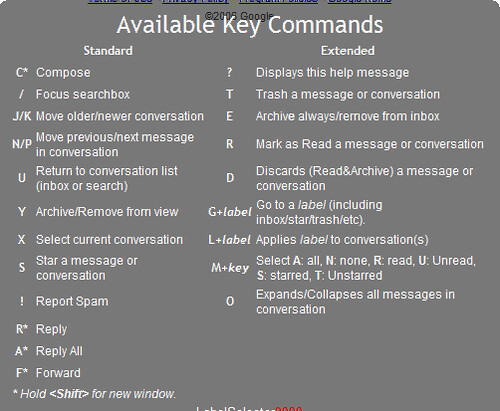
If you haven’t already, master the shortcut keys. Compose, mark as read, archive and much more with the press of a button. Sure, you know c for compose and ! for report spam, but do you know g + t for the sent mail folder? You can find a complete list at the official Gmail shortcut page.
2. Google Code Macros
The Greasemonkey extension for Firefox, familiar to many power users, allows JavaScript functionality on any web page. Piggybacking off of this capability, the generically-named Macros script enables a number of keyboard shortcuts. Google apparently integrated some of Macros shortcuts when revamping Gmail, but there are still functions that the Macros programmers believe Gmail needs. “I firmly believe this is *the* essential Gmail trick to end all Gmail tricks,” writes David Chartier at DownloadSquad.
3. Create bookmarklets for frequent searches
This form created by Steve Rubel generates a bookmarklet for searches in Gmail. (By the way, a bookmarklet is a baby bookmark that acts a single click tool for a webpage or browser—thanks, Wikipedia). Take Rubel’s form further by dragging the bookmarklets to your bookmarks bar.
4. Resize your compose box
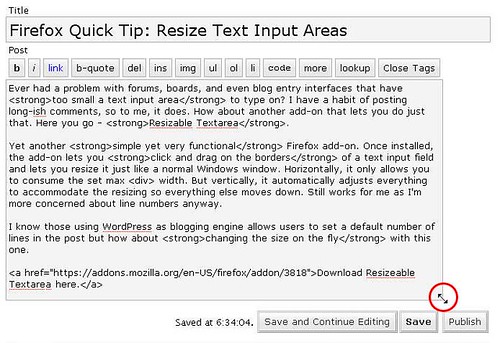
The aptly-named Resizeable Textarea Firefox extension allows you to click and drag the edge of your compose box without resizing your browser window. Note that any browser built with the newest Opensource.org webkit—Safari, for example—will already have this capability. For more browser info, check out the internet software category.
5. View unread messages first
Search on the string “label:unread label:inbox” to force all of your unread messages to the top of the list, writes Matt Cutts. (Note: you don’t have to create any labels for this to work.) Try bookmarking Cutts’s search and dragging it to your bookmarks bar to view all unread messages first.
6. Streamline adding attachments
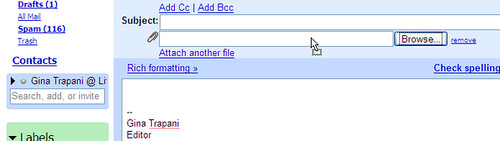
Wouldn’t it be great if you could drop attachments directly into the attachment box? Check out the Firefox extension Dragdropupload if you are running Firefox 2.0 (as of this writing, it hadn’t been updated for 2.0.0.12).
7. Quickly switch between Google accounts
If you have multiple Google accounts—a Gmail with Google Apps account and a regular Gmail account, for example—streamline them with this script for Firefox with Greasemonkey. The script adds a “change user” drop-down bar in place of the “sign out” link.
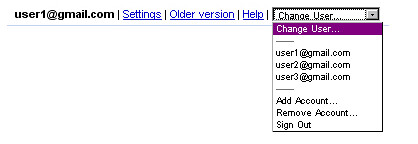
You can also try Gmail Manager (also a Firefox extension), which adds a Gmail menu bar to the Firefox window. Juggle multiple accounts, sign in and out.
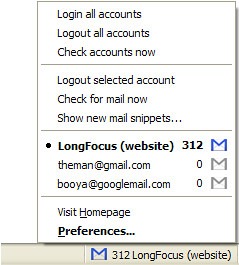
8. Bookmark a single email
As of November 2007, all Gmail messages have dedicated URLs (according to the official Gmail blog). Rather than killing a tree by printing the message or laboriously copying down the info, you can CTRL-D (or ?-D) an important email and refer to it at your leisure.
9. Automate frequently repeated text
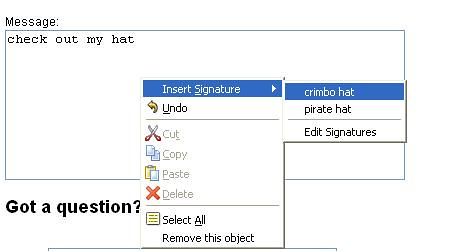
Signature functionality is built into Gmail, but frequently typed phrases can be automated with Firefox extension Signature, which allows you to insert designated text with a keystroke. (As of this writing, Signature is not yet compliant with Firefox 2.0.0.12.) Also try a Windows app called AutoHotKey or Mac app TypeIt4Me. Both apps allow you to create keystrokes to automate text in virtually any application.
10. POP3 & IMAP forwarding
“I recommend using IMAP (where the mail is both on the server and on your local machine(s)/device(s)) and uploading all your email onto Gmail,” writes Mark Wheeler, a Gmail power user. “You can keep copies on the Google servers and your desktop/laptop/phone so that they are all efficiently accessible and available anytime anywhere. Don't have to worry about backups, or disk space...I have 25,000 emails and have only used 9% of my space!”
To upload old email like my friend did, set up a Gmail IMAP account in your desktop email client. In the client, establish folders that correspond to your Gmail labels, and drag and drop your non-Gmail into the folders. If you're using Outlook with .PST format or Outlook Express, you will have to convert or export the emails to mBox data file format before the messages will translate. The process may take some time, and your client may hang. Also, the original dates and times attached to the messages will appear in Gmail as the dates and times that the messages were imported into Gmail. But it's worth the trouble to utilize your tricked-out Gmail, right? Click here for a tutorial from My Digital Life.
11. Mute a conversation
Ever found yourself subscribed to a mailing list and the current conversation has nothing to do with you? If you don’t want to unsubscribe, you can easily stop the friendly spam with the Gmail mute function. Select a message in the thread and hit the m key to auto-archive all incoming messages in the conversation. The thread will stay muted until you unmute it; it will also un-mute itself if your address appears in the To or CC box.
12. Get it all in one place
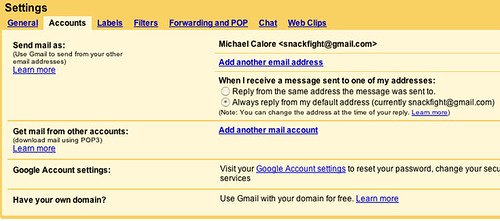
Gmail’s built-in Mail Fetcher allows you to receive and send from up to five different accounts via POP3. Unlike a simple forwarding feature, Mail Fetcher allows synchronizing of your Gmail actions with the home server. Go to your Gmail Settings ? Accounts, then Add another mail account. One caveat of sending from non-Gmail accounts: the recipients may see FROM you@Gmail.com on behalf of you@otherdomain.com, especially if the recipients are using a client like Outlook.
13. Get it all in one place
With the Google Toolbar and Gmail combined, power user Steve Rubel has made his Gmail account into a massive archive of his interests. Steal his trick by adding the Google toolbar to your browser. When you happen across text or images you want to save, highlight them and click the send to Gmail link. Rubel has also tons of other great hints.
14. Secure your email
Work that requires maximum security—or run-of-the-mill paranoia—is made easier with this script with Greasemonkey + Firefox. It'll force a secure connection when accessing Gmail. To make sure you're as secure as you can be, check out the internet security category at the web directory.
15. Don't forget that attachment
If your sent folder is full of "Oops, here's the attachment" messages, this handy reminder Greasemonkey script will scan your messages--including replies and forwards--for references to attachments. (The release notes say that it searches for "attached," "attachment" or certain unknown variations.) If you mention an attachment and forget to add it, a prompt will pop up.
16. Gmail Notifier for Windows / Google Notifier for Mac
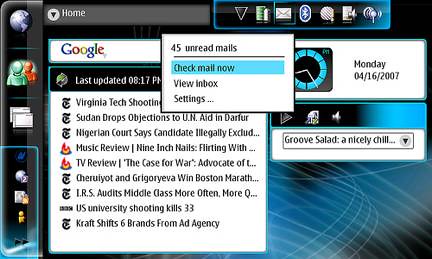
Rather than keeping a browser window open and hitting CTRL-R like you've got OCD, install a widget like Gmail Notifier for Windows or Google Notifier for Macs. It'll check your email (and Google Calendar, if you're a Mac user) as compulsively as you do. And as with almost everything else under the sun, there's a Firefox extension that will serve the same function (it's not released by Google).
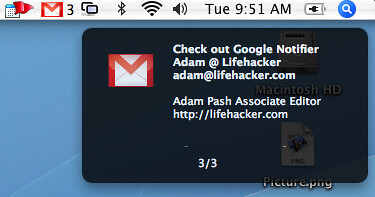
17. Google Desktop Plug-In for Google Notifier
Some users have reported compatibility issues between Google Toolbar, Google Apps and Google Desktop. Everyone's configuration is different, blah blah blah, so it's impossible to know, but Maxim Alexeyev created this Google Desktop Plug-In which purports to replace Google Notifier for Google Desktop and Google Toolbar users. The plug-in also offers multi-username functions and Google Apps support.
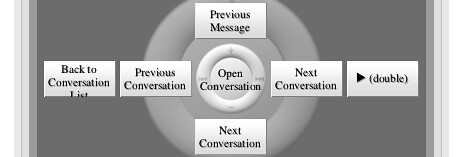
18. Check Gmail from the couch with Apple Remote
Mac users who actually use their Apple Remotes (show of hands—anyone? anyone?) can check out this Lifehacker tutorial that lets you check your Gmail from your couch with Firefox shortcuts. There’s gotta be someone out there who needs this…
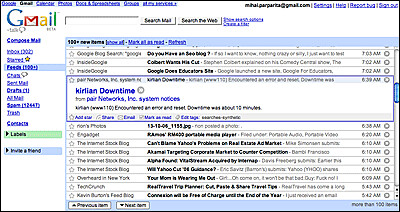
19. Read your Google Reader RSS feeds in Gmail
Treat your Google Reader RSS feeds the same way you treat old friends with this Greasemonkey + Firefox script. Feeds invading your Gmail will offer more-efficient time-wasting than ever before. Note that Google Reader and Gmail seem to be moving closer together in functionality and interface and it's likely that they'll soon be officially integrated.
20. Include or exclude Chat from search results
Chat conversations are automatically filed like emails with a Chat label, so to exclude Chat when searching, use the string -label:Chat. Conversely, to search only Chat conversations, use the string +label:Chat. The –label: and +label: syntax will work to exclude or include any label in Gmail search results. Another Jim Barr tip.
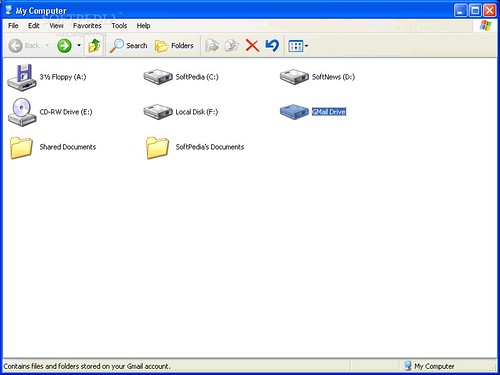
21. Use Gmail like an external hard drive
Use up any vegetating space in your Gmail account with this Windows drive shell extension. Your Gmail space appears in My Computer/Windows Explorer as an external drive, and when you drag and drop a file to the drive, it sends an email to your Gmail account with the file as an attachment. Note that this is a fairly old program but seems to have been updated for the latest Gmail version. Mac users can try gDisk and Linux users can check out GmailFS.
22. Spam counter hider
You’re browsing through your (overstuffed) inbox. You have many labels, filters and tricks that ensure that your email gets to you efficiently. Even so, you look at the number of messages in the spam folder and a small voice inside you says, “There could be something in the spam folder that doesn’t belong there!” Forget it. There never is. This Greasemonkey + Firefox script hides the spam count number, so the thought doesn’t even cross your mind.
23. Hack Gmail’s CSS
“Stylish is to CSS what Greasemonkey is to JavaScript,” says the Firefox extension page for Stylish. Cascade those style sheets yourself, or grab them from userstyles.org. For more web design tips and tricks, check out these web design and development resources.
24. Launch one-key composing with Launchy (Windows) or Quicksilver (Mac)
Launchy is a free, open source keyword launcher that runs in your system tray and opens apps with designated keystrokes. Launchy’s still “a far cry from Quicksilver for Mac” according to Gina Trapani at Lifehacker, but Adam Pash of Lifehacker says,
“I can't recommend it highly enough.” There’s a quick tutorial on one-key Gmail composing with Launchy—opening a browser logged into Gmail with a compose window with a single keystroke—here.

25. Better Gmail 2 with all-in-one Greasemonkey script
For a one-size-fits-all solution that combines several Greasemonkey scripts into one package, check out Better Gmail 2, which combines dozens of Greasemonkey scripts into one package. Allow HTML use in signatures, force a secure connection, convert labels into folders and make the spam folder invisible. There’s also a Better Gmail 2 extension for those using Firefox 3 beta. Cnet strongly recommends the extension in their review.
26. Create a podcast of your Gmail
Without an iPhone or Blackberry, the morning subway ride can get pretty boring. And you can’t navigate a smartphone while driving—or at least, you shouldn’t. Create an RSS feed from your Gmail account with this syntax:
https://username:password@gmail.google.com/gmail/feed/atom
Then sign for a FeedBurner account to host and distribute it. Use a RSS to podcast site like AudioDizer.com or one of the many options at NextUp to create text-to-speech files. Voila! This hack is based on a tip from Mike Donaghy. For even more, check out these podcast resources.
27. Force mailto: to open with Gmail
The annoyance of prompts from Outlook or Apple Mail with every mailto: link you click can be ended. This Greasemonkey script forces mailto: scripts to open Gmail. (Note: it’s unclear whether this script is compliant with the newest version of Gmail.)
28. Emulate a mail client
For those who can’t decide between a full-fledged mail client and browser-based Gmail, SimpleMail straddles the divide with a three-paned mail view. Mac users should note Adam Pash at Lifehacker warns that he had trouble getting IMAP to work with Firefox 3 on the Mac, but he doesn’t mention testing it with Firefox 2.0.0.12.
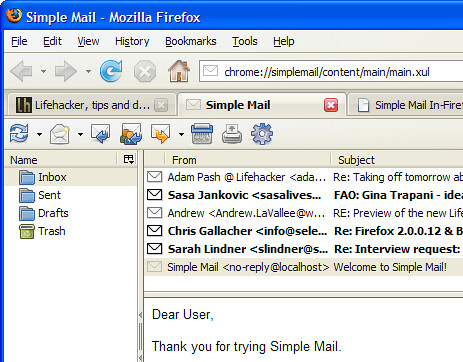
29. Sort mail with the Trusted Trio
Gina Trapani at Lifehacker suggests sorting your Gmail according to the Trusted Trio system—Follow Up, Hold and Archive. To keep the Inbox clear, sort all messages into one of these three categories. Since Gmail has an archive function built-in, Trapani suggests merely creating two labels—Follow Up and Hold; if desired, add numbers to get the two folders to display in the order you’d like. Check out the full explanation of the Trusted Trio system.
30. Pre-label and sort your mail
Many email providers, including Gmail, allow you to append your address with +something—for example, you can give all of your OS/2 user group buddies your address as you+OS2@gmail.com. (Note that Gmail addresses are not case sensitive). The incoming emails that wax nostalgic about IBM’s late great OS will be pre-labeled, and you can establish filters to sort them. The +something system also allows you to stop spam before it starts. If inappropriate emails with a designated +something address, you can kill off the address. You’ll also have an inkling how the spam got started. Thanks to Jim Barr for this tip.
31. Force Firefox extensions to work with Firefox 3 beta
This Lifehacker tip is for extreme power users only, as it could open your system to serious security flaws and bleeding edge malfunctions. It’s only a few easy steps after the jump. Have fun! User fluxam reports a list of extensions that were functioning in 3 beta as of 02/13/2008.
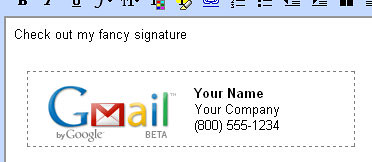
32. Add address-specific signatures with HTML
If you use multiple Gmail accounts, the Gmail HTML Signatures extension for Firefox + Greasemonkey automates the signature process. Based on the address you’re sending from, this extension will automatically insert HTML-formatted signatures.
33. Backup your Gmail
If you’re using a desktop or smartphone mail client, you’ve already got some backups of your email. But what if you’re all web-based? What if Gmail servers were hit by a nuclear bomb? Stop the paranoia and check the Gmail backup tutorial here and the Google Apps backup tips here.
34. Command line Gmail access (Windows) and nightly backup
There’s a tutorial—not for n00bs—here.
35. Force Gmail Notifier (Windows) to use SSL
This wikihow tutorial involves hex editing. Advanced Mac users with Google Notifier, here’s a comment on the O’Reilly Mac DevCenter forums that should help. Edit at your own risk.Thursday, November 20, 2008

This weekend we got our first proper snow of the season. On Saturday it rained and drizzled and froze and culminated in a slushy mess at the foot of the driveway, but on Sunday the snow came drifting quietly down in great clumpy flakes. I tried to explain the significance of this to my nephew; he quickly reminded me that at six months old, he's not quite interested in snowmen or sledding yet. In fact, he's not concerned with much beyond bottles and rattles and his auntie's dangly earrings.
I'm rather enjoying Nephew at this age. He's a profoundly happy child. Every time someone pulls a face at him he bursts into laughter, and he stares at me in awe whenever I play the guitar. (He seems to prefer John Mayer to anybody else. We might have to work on this... Sorry, John Mayer.) But as much fun as he is right now, he's growing like a weed. Every time I see him -- which is pretty frequently -- he has a new trick. His newest trick is the fine art of Mobility. Yikes, baby boy!
And while we're speaking of people growing too fast, my students -- most of whom I met two years ago when they were barely sophomores -- are now well on their way to graduation. When I first started teaching at my current school, I taught 10th grade. The following year, I moved up to 11th grade. This year, I'm teaching seniors. The result of my professional evolution has been that I've had the same base group of students for three years and am now inextricably attached to them. I'm up to my eyelids in college application essays they want me to look over and have already written a couple dozen letters of recommendation, but I still can't quite wrap my brain around the idea that they are leaving.
Of course, I plan to thoroughly enjoy them between now and May, and they're making that pretty easy. Not only are they behaving like angels, they're also working harder than ever, in class and out of it. Every year for Thanksgiving, our school has a massive food drive to benefit the community. The kids pour their hearts into fund-raising for it, and this year, of the 28 kids in my AP class, 18 of them were directly involved in the senior class's primary money-maker -- The Senior Auction. As a proud supporter, I went to the auction and "purchased" a trio of my boys. Their task in return for the money I paid was to each perform a soliloquy from Hamlet for their classmates. They did a fantastic job. In addition to their assignment, they also brought me a mass of roses, a box of chocolates, and a latte; made me lunch; and prepared a little N'Sync dance number for the class.
I love these kids.
For who would bear the whips and scorns of time?
Monday, November 17, 2008
Change ip address using simple trick. Only for bsnl broadband users!!
0 comments Posted by imran at 3:17 AM1.) First type 192.168.1.1 in your address bar and press enter. You will get a pop-up as shown in the preview asking for username and password.
If you are using bsnl broadband connection via Ethernet cable then 192.168.1.1 and if you are using bsnl broadband via USB cable then 192.128.1.2.. Rest all procedure is same for both..
Type the username: admin and password : admin. Its common for all and incase if ur service provider is using something different then ask them for the same.. Then press OK..
2.) Click on "WAN" from the list of options..
3.) Here under PPPoE/PPPoA and in AUTHENTICATION first keep the option "PAP" anc click on APPLY and check whether your ip address is changed or not.. If its not changed then select the option "CHAP" and click on APPLY. Do this untill IP ADDRESS CHANGES.. Usually two or three times will do the work for you..
4.) Keep refreshing the Rapidshare site to check whether the IP ADDRESS is changed or not. RAPIDSHARE tracks your IP ADDRESS when u download a file and when you start to download another file it asks to purchase PREMIUM account. So if you change the IP ADDRESS it wont recognize your previous download and you can download as many times you change your IP ADDRESS. If you successfully change your IP ADDRESS then u can download as much as you want from RAPIDSHARE... One of the biggest and fastest one-click file hosts in the world. There are many other methods also to change the Ip Address and Download unlimited from Rapidshare.. This is a simple trick i accidently discovered!!
Wednesday, November 12, 2008
Today is facebook's 2nd annual "To Write Love on Her Arms" Day. Read it. Share it. Live it.
http://www.twloha.com
Tuesday, November 4, 2008
Sunday, November 2, 2008
21 Online Free Web Based Applications That You Probably Would Love To Use Every Day!
0 comments Posted by imran at 5:36 AMToday, we are listing 21 free and online web based applications which are very helpful for you to process your daily work. If you are designer, developer, office worker, manager, supervisor, student, home user, etc." class="ver">etc but we make sure to add something interesting for everyone. Most of them are not very well but, or begin a new sentence." class="ver">known but they are really amazing in respect to their features. Just take a look at them and share your thoughts here.
You are welcome to share if you know about any free web based application which our readers may like.
Phonevite
Sending reminders and alerts, with your own voice, is easy and simple using Phonevite™. With this tool, you can send free phone reminders & alerts to yourself and/or your friends in 3 quick, easy steps.
Google Docs
You can import your existing documents, spreadsheets and presentations, or create new ones from scratch. Invite people to your documents and make changes together, at the same time. All you need is a Web browser.
crazyegg - visualize your visitors
Crazy Egg will help you improve the design of your site by showing you where people are clicking and where they are not.
Windows Live OneCare safety scanner
Windows Live OneCare safety scanner is a free service designed to help ensure the health of your PC.
hooeey - Record, retrieve and analyze your web hops
hooeey is a personal web application that records all web links that you browse and lets you use them in a fun and productive way.
vuzit
Vuzit is a web based document viewer you can embed in any web page. It’s fast to add and it’s free!
codepaste
CodePaste provides an easy and convenient way to send/share PHP, C++, Javascript, Java, CSS, Actionscript and HTML code with others. Copy and paste the code and enter the email where you want the CodePaste to send it. CodePaste then nicely formats the code and sends it over.
Sprout Builder
Sprout is the quick and easy way for anyone to build, publish, and manage widgets, mini-sites, mashups, banners and more.
infoencrypt - Online service for easy encrypt messages
This is service for securing your messages in an easy way. All you need is only to enter a message text of your message and encryption password. The password will be used for both encryption and decryption. The system will encrypt your message using strong encryption algorithm, and it will be secure for sending. Anyone who intercepts the encrypted message without password will not be able to read original message.
Premier Survey
Free survey software for online surveys, web surveys, email surveys. Free Online survey software for customer satisfaction surveys, employee satisfaction surveys, market research surveys.
Primo Online
PrimoOnline provides a super-fast way to create PDF files online, without the need to install any PDF software. Simply upload your file, enter your email address, and our server-based PDF creator will quickly convert it to PDF and deliver it straight to your email inbox.
postica - stick it! Create and share sticky notes
Postica lets you create sticky notes, attach a file, and share them with your friends.
TinySong
TinySong allows you to quickly share music links with your friends.
Adobe Buzzword
Adobe® Buzzword® is a new online word processor, perfect for writing reports, proposals, and anything else you need to access online or work on with others. It looks and behaves like your normal desktop word processor, but it operates inside a web browser, so there’s no installation required.
ShrinkFile.NET
ShrinkFile.net is a free resource to compress your text documents, images, PDF files and other data online, because some computers don’t have WinZip or WinRAR installed. ShrinkFile.net will host the uploaded content at a static URL for one week, allowing you to share the file with family and friends.
Awesome Highlighter
Awesome Highlighter lets you highlight text on web pages and then gives you a small link to the highlighted page.
CreativePro Office
CreativePro Office is the most complete set of online office management tools you’re likely to find at any price - and it’s completely free! Manage your team, clients, projects, invoices, events from one web-based application.
ConceptDraw
ConceptDraw Visio File Converter is a free web service, provided by Computer Systems Odessa that is available to anyone who uses diagramming software and has a requirement to open Visio (VSD) documents. This service have been created because Visio users often don’t save their drawing into Visio XML (VDX) file format.
Hide My Ass
An anonymous free proxy service aimed at hiding your online identity. Use our service to hide your IP address and bypass your work/school web filter with ease.
RescueTime
RescueTime is time management software that helps individuals and businesses understand how they spend their time, and provides tools to help them spend it more productively.
Picnik
Picnik makes your photos fabulous with easy to use yet powerful editing tools. Tweak to your heart’s content, then get creative with oodles of effects, fonts, shapes, and frames.
Friday, October 31, 2008

Jeturn to the Red Alert continuity of the esteemed Command & Conquer RTS franchise in this full-fledged series sequel. Red Alert 3 breaks new ground in the RTS genre, featuring a fully co-operative campaign while bringing back the series’ light-hearted style and classic, action-oriented gameplay.
In Red Alert 3, the desperate leadership of a doomed Soviet Union travels back in time to change history and restore the glory of Mother Russia. The time travel mission goes awry, creating an alternate timeline where technology has followed an entirely different evolution, a new superpower has been thrust on to the world stage, and World War III is raging. The Empire of the Rising Sun has risen in the East, making World War III a three-way struggle between the Soviets, the Allies, and the Empire with armies fielding wacky and wonderful weapons and technologies like Tesla coils, heavily armed War Blimps, teleportation, armored bears, intelligent dolphins, floating island fortresses, and transforming tanks.
1. Unrar.
2. Burn or mount the image.
3. Install the game.
4. Copy over crack from the /Crack dir on the disc to your install dir.
5. Play the game, make sure to firewall the exe from going online or the
game will nag you about installing updates constantly.
System Requirements:
OS – Windows XP / Vista (32-Bit)
Processor – XP: 2.0 GHz (Intel Pentium 4; AMD Athlon 2000+; Multiple Cores) / Vista: 2.2 GHz (Intel Pentium 4/AMD Athlon 2200+/Multiple Cores)
Memory – XP: 512 MB / Vista: 1 GB
Hard Drive – Media: 6.0 GB / EA Link: 12.0 GB
DVD Drive - 8 SPEED
Video Card – XP: 64 MB / Vista: 128 MB
Sound Card - DirectX 9.0c compatible
DirectX - Version 9.0c
Online Multiplayer – 512 Kbps or faster; 2-8 Players
Input - Keyboard, Mouse
Optional – VoIP Headset
Size: 6.21GB
Download:
http://rapidshare.com/files/158914350/rld-ra3.r00
http://rapidshare.com/files/158913269/rld-ra3.r01
http://rapidshare.com/files/158913343/rld-ra3.r02
http://rapidshare.com/files/158914941/rld-ra3.r03
http://rapidshare.com/files/158915990/rld-ra3.r04
http://rapidshare.com/files/158914421/rld-ra3.r05
http://rapidshare.com/files/158914069/rld-ra3.r06
http://rapidshare.com/files/158914072/rld-ra3.r07
http://rapidshare.com/files/158914095/rld-ra3.r08
http://rapidshare.com/files/158914453/rld-ra3.r09
http://rapidshare.com/files/158914630/rld-ra3.r10
http://rapidshare.com/files/158914702/rld-ra3.r11
http://rapidshare.com/files/158914653/rld-ra3.r12
http://rapidshare.com/files/158914721/rld-ra3.r13
http://rapidshare.com/files/158846064/rld-ra3.r14
http://rapidshare.com/files/158846018/rld-ra3.r15
http://rapidshare.com/files/158939882/rld-ra3.r16
http://rapidshare.com/files/158939864/rld-ra3.r17
http://rapidshare.com/files/158939903/rld-ra3.r18
http://rapidshare.com/files/158940241/rld-ra3.r19
http://rapidshare.com/files/158940229/rld-ra3.r20
http://rapidshare.com/files/158940254/rld-ra3.r21
http://rapidshare.com/files/158940441/rld-ra3.r22
http://rapidshare.com/files/158940378/rld-ra3.r23
http://rapidshare.com/files/158940444/rld-ra3.r24
http://rapidshare.com/files/158940648/rld-ra3.r25
http://rapidshare.com/files/158940616/rld-ra3.r26
http://rapidshare.com/files/158940631/rld-ra3.r27
http://rapidshare.com/files/158945878/rld-ra3.r28
http://rapidshare.com/files/158948362/rld-ra3.r29
http://rapidshare.com/files/158948334/rld-ra3.r30
http://rapidshare.com/files/158948428/rld-ra3.r31
http://rapidshare.com/files/158948613/rld-ra3.r32
http://rapidshare.com/files/158948584/rld-ra3.r33
http://rapidshare.com/files/158948597/rld-ra3.r34
http://rapidshare.com/files/158948785/rld-ra3.r35
http://rapidshare.com/files/158948757/rld-ra3.r36
http://rapidshare.com/files/158948807/rld-ra3.r37
http://rapidshare.com/files/158949095/rld-ra3.r38
http://rapidshare.com/files/158949072/rld-ra3.r39
http://rapidshare.com/files/158949115/rld-ra3.r40
http://rapidshare.com/files/158949126/rld-ra3.r41
http://rapidshare.com/files/158951064/rld-ra3.r42
http://rapidshare.com/files/158951126/rld-ra3.r43
http://rapidshare.com/files/158951127/rld-ra3.r44
http://rapidshare.com/files/158951277/rld-ra3.r45
http://rapidshare.com/files/158951256/rld-ra3.r46
http://rapidshare.com/files/158951311/rld-ra3.r47
http://rapidshare.com/files/158951602/rld-ra3.r48
http://rapidshare.com/files/158951582/rld-ra3.r49
http://rapidshare.com/files/158951611/rld-ra3.r50
http://rapidshare.com/files/158951822/rld-ra3.r51
http://rapidshare.com/files/158850774/rld-ra3.r52
http://rapidshare.com/files/158951823/rld-ra3.r53
http://rapidshare.com/files/158952103/rld-ra3.r54
http://rapidshare.com/files/158952132/rld-ra3.r55
http://rapidshare.com/files/158952130/rld-ra3.r56
http://rapidshare.com/files/158953445/rld-ra3.r57
http://rapidshare.com/files/158953465/rld-ra3.r58
http://rapidshare.com/files/158953544/rld-ra3.r59
http://rapidshare.com/files/158953493/rld-ra3.r60
http://rapidshare.com/files/158953923/rld-ra3.r61
http://rapidshare.com/files/158953880/rld-ra3.r62
http://rapidshare.com/files/158953890/rld-ra3.r63
http://rapidshare.com/files/158954210/rld-ra3.r64
http://rapidshare.com/files/158954135/rld-ra3.r65
http://rapidshare.com/files/158954238/rld-ra3.rar
Thursday, October 30, 2008
A little Switchfoot for you this chilly October morning...
I'm a plane in the sunset
With nowhere to land
Wednesday, October 29, 2008

My kid sister just got a job in my favorite sandwich shop. She finished her undergraduate work last May, and she's quickly discovered that holding a BA from a prestigious liberal arts university means very little in the work world. To get a real career in her field, she'll have to go back for a Master's (at least). Despite her brilliance and her work ethic, she's joined the ranks of thousands of members of Pepsi Generation Next© who went off to college a few years ago but are now living back in their parents' basements, working minimum wage jobs, and playing World of Warcraft. Because of this, we've been dubbed the Boomerang Generation and accused of being incurably adolescent. It's not all our fault though. Ever since the first day in Miss Gerkin's kindergarten class, we were taught we could grow up to be whatever we wanted; all along, the truth was that we could grow up to be whatever someone else would pay us for. That was a mean trick, Miss Gerkin.
But I do admit that the WoW has gotten a bit out of hand. I mean, I like dragons and stuff, but seriously...
So about my sister and the sandwich shop...
I thought it was really cool. Not just because I was looking forward to free sandwiches (though the thought did cross my mind). I thought it was cool because I thought it was a great little shop. I've been in there a billion times. They have this Smokehouse Turkey Wrap... mmm! Party for your taste buds! She'd also been job-hunting for quite a while with no success, so we were all pretty relieved that she finally landed something.
Then she came home from her first day of work, plopped down on the couch, and declared that she hated it and was going to immediately start looking for something else.
Being the loving older sibling, I immediately started dispensing some love of the "tough" variety. My sister is a great kid and pretty hard-working, but she's not very good at taking orders. (Trust me -- I've been trying to give her orders for 22 years now.) Naturally, I thought she needed to man up a bit in the face of an obnoxious boss or sore feet or whatever was ailing her. With the economy all in a shambles, you don't walk out on a brand-spankin'-new job just because you're unhappy. Especially if you live in your parents' basement.
Well, then she started explaining to me exactly why she didn't like it. Her reasons included things like the uniform they gave her -- which was a dirty company t-shirt (complete with grease smudges & stink), which some former employee had left in a wad in a corner of the coatroom; the food prep area, where other employees (manager included) were consuming their own food and drinks on the disinfected(ish) prep counter whilst preparing orders; and the mushrooms, which her trainer advised her to throw into the slicer without cleaning, even when she inquired about the conspicuous clumps of dirt on them.
Um, yeah.
Obviously, anybody would think the place a bit suspect after hearing that, but I used to manage a little coffee bar, and I am an exacting sumbitch when it comes to Health Code. You think it's bad; I know precisely how bad it is. And if those kind of blatant things are going on, I also know that they aren't monitoring the temp of their refrigerators or the concentration of their disinfectant rinse or the laundering of their rags or... well, I could go on for a while.
So ever since my kid sister got a job at my favorite sandwich shop, I don't eat there anymore.
What's that thing they say about ignorance... and bliss?
Sayonara, Smokehouse Turkey Wrap.